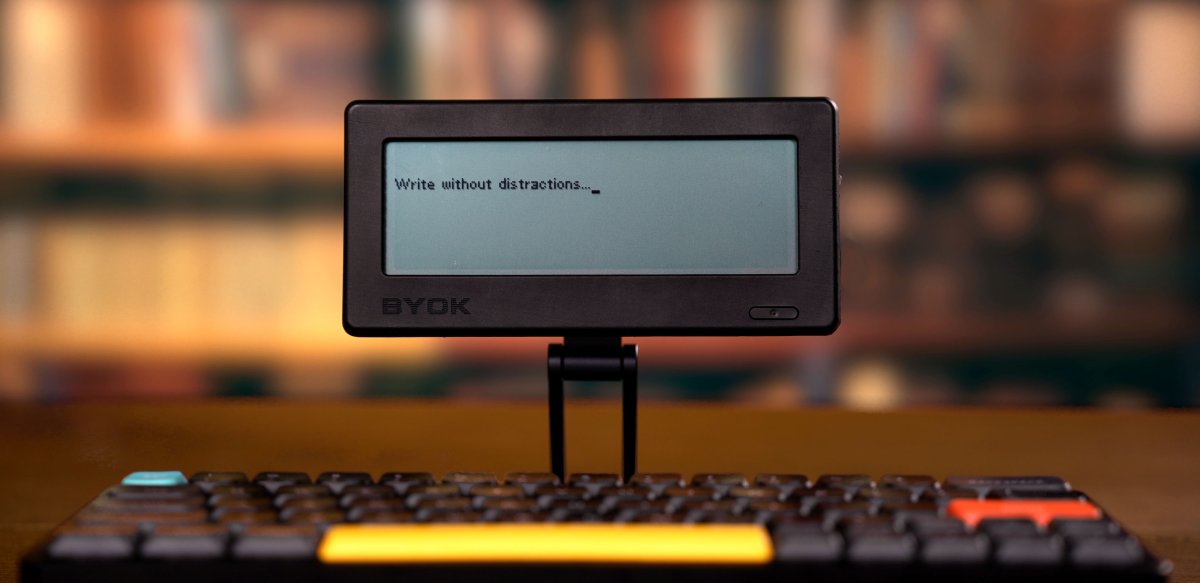
I like to write, especially with fountain pens. However, for editing and sharing what I write, nothing beats a full-size keyboard. This post is about my quest to find the ultimate portable device(s) for typing distraction-free anywhere.
First, a bit of my history:
I learned to type on a mechanical typewriter in high school long ago. Back in those days, the class was meant for women who wanted to be ‘secretaries’. Yeah, that long ago. I was the only male student in the class. Why did I want to learn to type? Because our school was getting a computer! This was an IMSAI 8080 running a timesharing OS that was booted from paper tape. The paper tape reader/puncher was part of a Teletype, a free-standing electronic typewriter/paper printer. Here’s a photo of me in 1978 working on the Teletype.
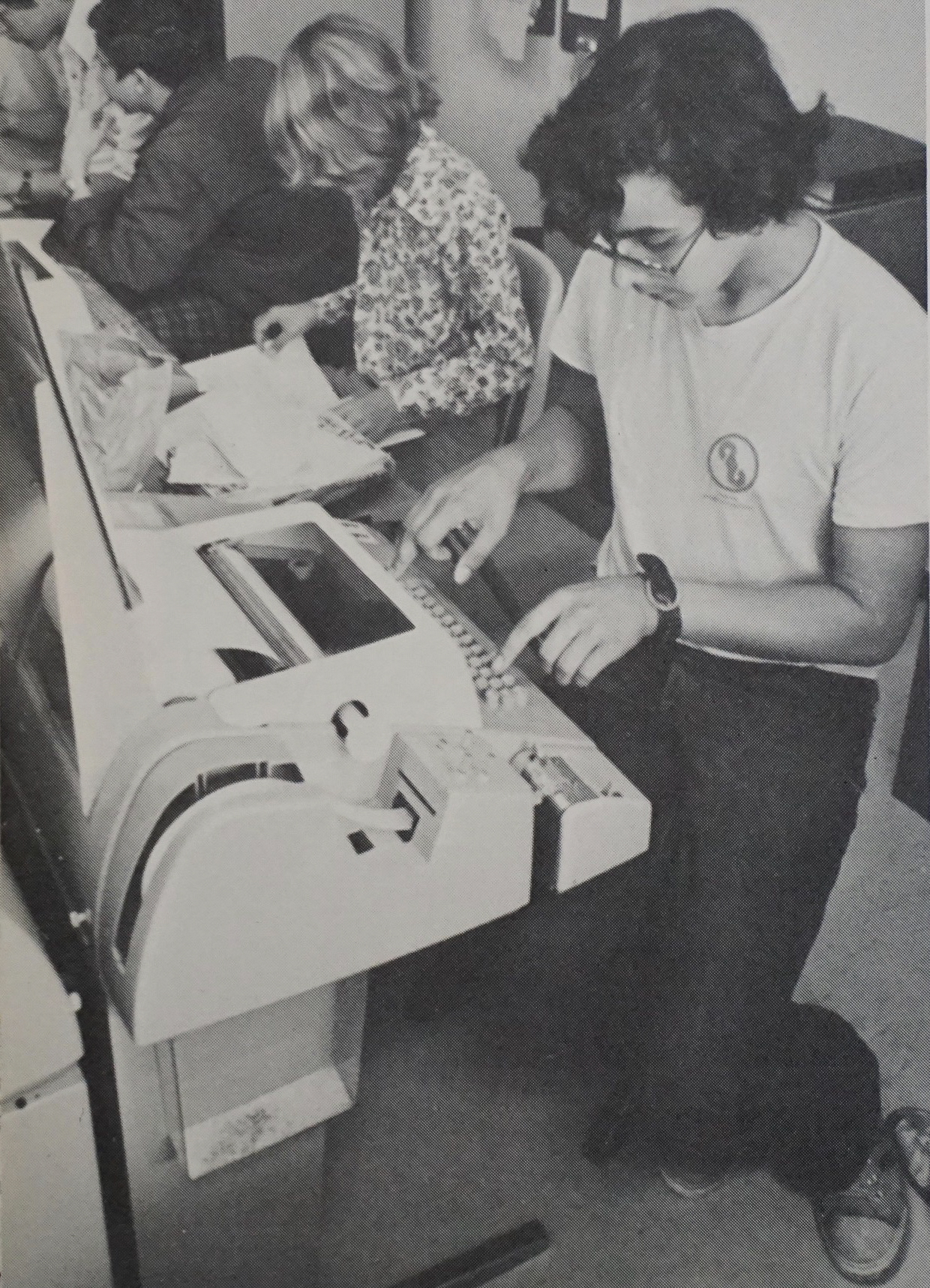
The teletype keyboard was clunky, but it was enough to learn programming on. From there, it went to typing on keyboards belonging to ‘terminals’, including IBM 3270s, VT100s, and HP 2632As. All with Big ass, heavy keyboards. Eventually, it was keyboards attached to – or part of – personal computers of different kinds, including my first computer purchase: a Macintosh 128K.
After that, it’s hard to keep track of all the keyboards I used over the decades. Arguably, the most interesting of those was the Symbolics (LISP Machine) keyboard, a sleek design with dedicated keys for shift, control, alt, meta, and hyper. There were also three keys labeled with icons: triangle, square, and circle.
The advantage of using a terminal or a DOS-based PC was that it was text-only (line graphics aside) and only one program at a time. You could run a word processor and nothing else concurrently. Yes, this changed over time, but the notion of having the screen dedicated to one program at a time allowed for relatively distraction-free typing.
But with the advent of the Xerox Alto, Symbolics, Macintosh, and then Windows, the visual screen started getting cluttered. No longer was the screen dedicated to typing, but now allowed you to have multiple apps up and switch between them anytime. Great for trying to do lots of things. But now, distraction-free typing wasn’t enforced by the device; it required attention & discipline. Which I didn’t have.
At the same time, there was the rise of portable computing devices with screens and the ultimate distraction of them all, the Internet. And so the hunt started for a better way to have a distraction-free typing experience.
Luggable to Portable Computers
The design of portable computers with built-in keyboards began early. PCs like the Osborne One and the Compaq Portable. I even lugged around my 22-lbs Mac in its own bag with space for its keyboard. Then laptops came on the scene. I can’t remember which laptop I used first. (However, I did send an email from a Tandy TRS-80 Model 100 in a San Francisco ComputerLand in 1981. But more on that later.)

DOS-based early laptops were likely the first distraction-free, truly portable typing platforms available since the Olivetti Valentine. Although not quite a laptop, I did get to use an HP Integral PC running Unix and a monochrome plasma screen while working at HP. In later years, I used the IBM P70, a similar “sewing machine” style luggable.
My first true portable computer was a Compaq Aero 4/33c* laptop I bought in 1994. It had its own trackball and grayscale LCD screen. And it was very small for a laptop at the time. I loved its design.
.jpg)
Fast forward to working for a large consulting company, when I traveled a lot. That included hauling around a recent IBM ThinkPad model, most of which I don’t recall. Except for one: the IBM Thinkpad 701 with its ‘butterfly’ fold-out keyboard, the first folding keyboard I got to use.
The 701 managed to fit a full-sized (for a laptop) keyboard in a space about two-thirds the width of the keyboard itself. Although it was very cool, the mechanics of sliding the keyboard sides together and apart must have been quite complex, leading to more maintenance and a greater chance of breakdown. My guess is that trying to reduce the keyboard’s size through folding or sliding just wasn’t worth it for the manufacturers. Since then, no laptop manufacturer has released a laptop with a keyboard that folds or is otherwise stored in multiple parts. (Detachable, yes, but still in one piece.)
How small can you get (a keyboard)
So, how small can a keyboard get and still allow fast touch typing? Of course, it depends on the individual who is typing. Smaller hands and fingers do better on smaller keyboards. But in general, where is the size limit? For me, it was the Psion 5c personal digital assistant. This had a jointed clamshell design that brought out a tiny yet quite usable mechanical keyboard. Yes, touch typing on a Psion 5* was possible, although it took practice. And it was only for short typing sessions; I couldn’t really type on it for long.

Computers the size of a keyboard
The other approach was to shrink the computer around the keyboard rather than the keyboard itself. In 1981, I walked into a ComputerLand store in San Francisco where they had a Tandy TRS-80 Model 100. This was the first “slate” (or slab, block, or brick) computer with a full keyboard and a very small 8-line LCD display. At the store, I plugged it into a phone jack, connected to the school mainframe, and sent a short email message. It was like jumping into the future.
Granted, the Model 100 was still a general-purpose but still limited computer, not a dedicated writing system. But it really represented for me the first portable device for distraction-free typing. Since then, many popular writing devices have a similar form factor. I’ve tried a few of them, but I’ve never used most of the non-laptop computers that were and are sold as distraction-free writing devices.
Possibly the earliest one was the Brother WP-760D typewriter with a small LCD screen that allowed you to edit before it printed on the built-in printer. It looked like a portable typewriter, but now with the ability to see and change the text before it gets inked onto paper. The first one I remember (after the Model 100) was the Apple Newton eMate 300. I was a big fan of the original Newton (a story for another day), so it made sense to me to blend a Newton and a keyboard together in a clamshell form. Not quite a laptop, it had a touch screen and its own carrying handle. Unfortunately, by the time it came out, Newton was already a dead platform.

Alphasmart, founded by a bunch of ex-Apple employees, took the Model 100 format and made several full-keyboard-with-screen devices. The AlphaSmart 3000, which came out in 2000, is still favored by many today as a great distraction-free writer. The last AlphaSmart was the Neo 2, which was heavily marketed to schools.
One of the big challenges for most of these devices (and as we’ll see, PDAs) was transferring the text off the device. This often required using a serial or similar cable hooked to a PC or Mac. Some also transferred data using an infrared transmitter to a receiver.
The emergence of Folding (and mini) Keyboards
With the Palm Pilot*, PDA (Personal Digital Assistants) had their heyday for a decade or so. Most were pocket-sized, with the ability to write on a pad or screen, or came with a screen-based mini “soft” keyboard. But people still wanted to type at full speed, even into these small devices. Palm introduced the Palm Portable Keyboard*, a “full” keyboard that folded from four hinged parts. This had a docking station to stand the Palm Pilot into, so one could type while seeing the screen.

From there, the market for portable, foldable keyboards just sprouted. Models like the Think Outside Stowaway, GoType!, and other keyboards (many with Infrared data transfer) came out. Even though technically the PDAs were more than just text-capture devices, the experience with a full keyboard was still mostly distraction-free.
All in the thumbs
Around the same time, the “mini” keyboards, the size of a pack of cards, began appearing. They appeared as add-ons to PDAs and even cell phones, like the Ericsson Chatboard*. Then the keyboard got built into the device itself, including cell phones. Fold out, slide out, or simply on the bottom of the device (like the Blackberry), these tiny keyboards were never meant for touch typing. Instead, they were usually “typed” using one’s thumbs. Better than the T9 way of typing on a numeric keypad, they made it easier to type messages on the go.
These were never for serious typing, though, regardless of how fast some people could fly their thumbs across the small, packed-in buttons. Smartphones have mostly put an end to these tiny keyboards, favoring ‘soft keyboards’ that appear on the new touchscreens. Soft keyboards, even on tablets, are arguably not designed for touch typing (though some people have typed up to 80 words per minute on them). And the new swiping touchscreen keyboards make entering words faster for many, but it’s still not as quick as typing on a full-size keyboard (at least for me).
The magic of Bluetooth
What finally created the explosion of new folding keyboard options was the adoption of Bluetooth, enabling keyboards (and mice) to be wirelessly connected to computing devices of almost any size without a dedicated receiver dongle.
The first Bluetooth keyboards were primarily non-folding full-size ones that allowed using a full-size keyboard instead of the tightly spaced laptop keyboards. After the Apple iPad came out in 2010 and tablets became more popular, Bluetooth keyboards really took off. In addition to enabling the use of regular non-folding keyboards with these devices, keyboard makers started making ‘folio’-style smaller keyboards the size and form factor of the tablets themselves, resulting in improvised clamshell laptop-like tablets.
At the same time, new folding keyboards appeared, enabling touch typing with both tablets and smartphones. It was around then that I started my quest to find a great, portable folding keyboard for my phone or tablet. It still wasn’t distraction-free writing, but it came closer, especially as minimalist text editor apps like iA Writer became available.
I tried using the Microsoft Universal Foldable Keyboard*. Very thin when folded, it has a nice key feel, except for one major problem: a gap between the two halves of the keyboard when opened. Not only did it feel weird, but hitting the space bar required learning how to type on that keyboard. The point of using a folding keyboard is not to have to learn that specific keyboard.
What followed is a string of trying relatively low-cost folding Bluetooth keyboards, many from generic Chinese manufacturers. Of those, the Geyes* was one of my favorites. A trifold model (along the length of the keyboard) made the keyboard layout consistent, and it even had a built-in stand for a table or phone.
What I’ve settled on for now is the ProtoArc keyboard* that folds in half, but does so in a way that eliminates the gap in the middle and gives me a large enough spacebar. I still occasionally hit the bottom hinge, but so far it’s the best one I’ve found.

But all the distractions!
Finding a great folding keyboard is great, but using an iPad or iPhone doesn’t give the true distraction-free writing experience I’m looking for. Yes, I can turn off notifications. But the apps are still there, pulling on my weak-willed, ADHD-driven minimal attention control. I still wanted something that would keep me focused, allowing me to do nothing but type.
So, I was now looking at the new dedicated devices for distraction-free typing. Probably the best-known of those devices are the Freewrite portable “dedicated drafting” devices, from the $700 Smart Typewriter with a large E-ink screen to the smaller Alpha slate-style device. Their Traveler model looks almost perfect, providing a small clamshell form with a large E-ink screen. But at $350, the Alpha with 3 lines of text on an LCD is pretty pricy.

There are a few other options on the market, including the Pomera models from the Japanese company King Jim. The Freewrite and King Jim models all have Wifi. Freewrite automatically syncs your documents with cloud services, making backups easy, and includes a one-way-out email sending button. With the exception of one of the King Jim models (DM30, which has an almost origami folding mechanism), all these devices have keyboards equivalent to or larger than laptop keyboards. The larger ones have full mechanical keys, while the smaller ones use scissor-style mechanical keys.
There is a community of DIYers that builds their own dedicated portable writing devices, including on Reddit at r/WriterDeck. The Raspberry Pi and similar low-cost computing boards provide a great starting point for building a custom writing device. The open-source design, ZeroWriter, includes instructions for printing a 3D shell and using e-ink displays (though you can buy it for $270).
And many writers have repurposed older laptops, including ultraportable classics like the Toshiba Libretto, with stripped-down Linux installs for distraction-free writing. Netbooks and Chromebooks are also popular for writing, though they often come with the distractions I’m trying to avoid.
Bring Your Own Keyboard
So now I’m trying a new device: the BYOK. I just got this at least a year after its Kickstarter was successful. It took a while to get the design done and manufacturing right, but I think it was worth the wait. The BYOK is a small rectangular device, about the size of a smartphone (maybe a little thicker), that only provides the screen (and underlying software, etc.).) You have to bring your own Bluetooth keyboard. It supports 4 to 8 lines of text on a backlit LCD, has a battery, and even includes a MagSafe-compatible magnetic ring mount.
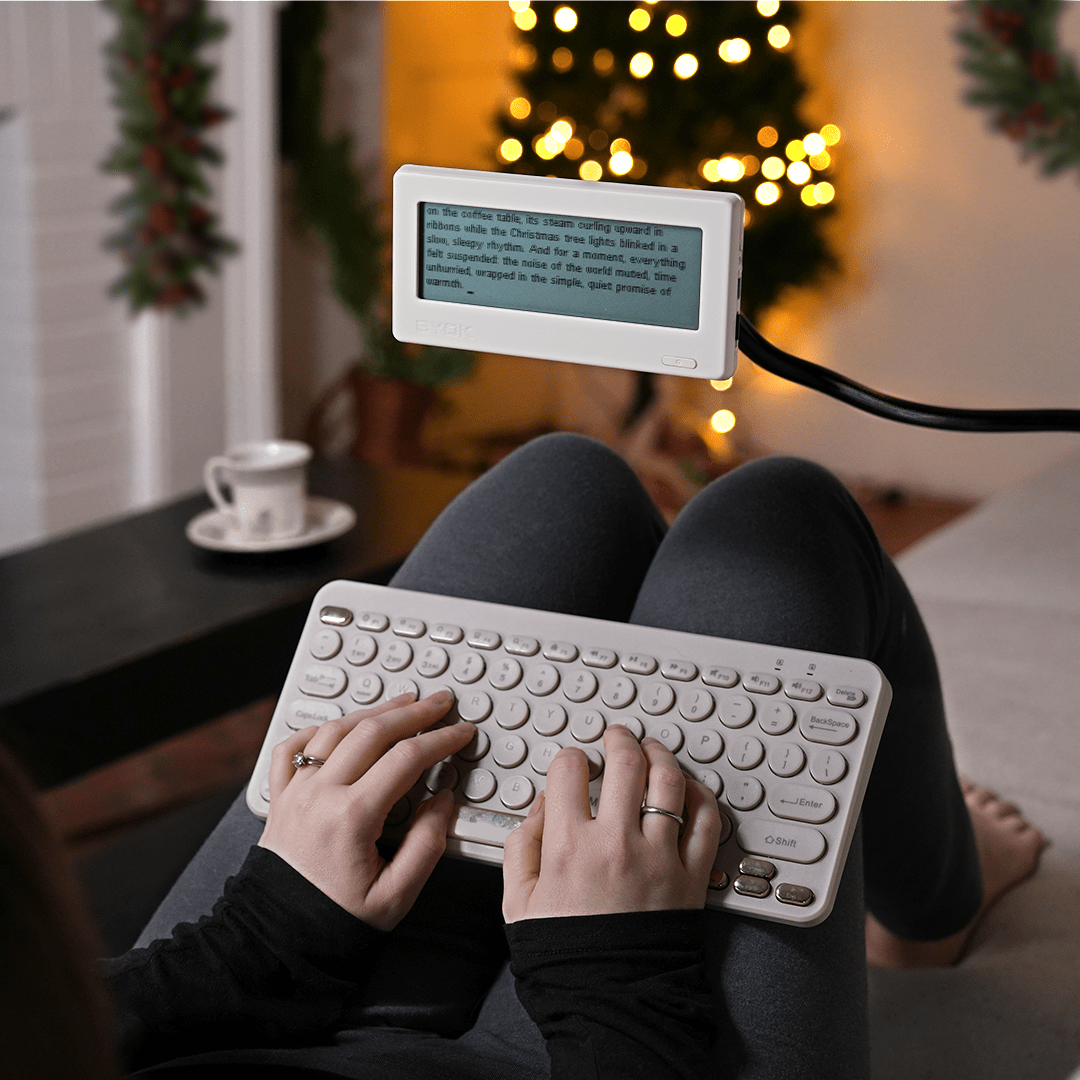
It’s not fancy. The text is very 8-bit-ish, and it has minimal editing capabilities. But it does have an SD card slot, Wi-Fi, and a free synchronization service for their editing web app (which is still a work in progress but has plenty of interesting features). It’s solidly built and comes with its own case for $179 (I got it for less on Kickstarter).
I can’t say I’ve used it much – yet. I typed most of this post before I got the BYOK, as this quest has been going on for a long time. But for less than $200 and a decent keyboard (the Protoarc I bought is the cheaper model at around $30), it’s still a better and more flexible setup than the Freewrite Alpha. I’m sure the Freewrite’s are great, but I don’t write enough (or professionally ever) to justify spending that kind of money.
(*) Devices that I bought myself
 Architecture Remix
.jpg)